Your Guide to AI Watermark Remover Video Tools

Discover how a watermark remover video tool can safely clean up your footage. Learn AI-powered techniques for fast, legal, and high-quality results.
If you've ever had a great piece of video footage ruined by a distracting logo or text overlay, you know how frustrating it is. The good news is that a quality AI watermark remover video tool can clean that up in seconds, and without the blurry mess left by older software.
This isn't just about covering something up; modern AI intelligently reconstructs the background pixels, preserving the original quality of your footage.
How AI is Changing the Game for Video Editors
For anyone creating or marketing video content, an unwanted watermark can completely derail your efforts. It breaks brand consistency, pulls viewers out of the moment, and can make even the most professional footage look amateur.
Not long ago, getting rid of one was a nightmare. It meant diving into complex editing software, painstakingly editing frame by frame, and sinking hours into a tedious task. Even then, the results were usually a let-down, leaving behind a tell-tale blur or an obvious digital patch. You either had to scrap the footage or publish it with someone else's branding front and centre.
Thankfully, those days are over. AI-powered tools have completely flipped the script, turning a specialist skill into a simple, automated process that anyone can use.
It's All About Pixel Reconstruction
The real magic behind a modern watermark remover video tool is how it thinks. Unlike old-school methods that just crop or blur an area, AI operates on a whole different level of intelligence. It doesn't just hide the watermark; it rebuilds the scene as if the logo was never there.
Here’s a quick look at how it works:
- Contextual Analysis: First, the AI scans the pixels around the watermark. It learns the background's colours, textures, and patterns to understand what's supposed to be there.
- Intelligent Filling: Using that data, it generates brand-new pixels that blend seamlessly into the original scene, creating a natural-looking result.
- Motion Tracking: If the watermark moves or the camera is panning, the algorithm tracks the area across every frame. This ensures the reconstructed background is consistent and clean throughout the entire clip.
This sophisticated approach is what makes today's tools so effective. It’s the difference between a clumsy cover-up and a professional-grade restoration.
Let's break down just how far we've come.
Traditional vs AI Watermark Removal
Here's a quick comparison highlighting the key differences between old manual methods and new AI-powered solutions for removing video watermarks.
| Feature | Traditional Methods | AI-Powered Tools |
|---|---|---|
| Process | Manual, frame-by-frame editing | Automated, one-click process |
| Time Required | Hours or even days | Seconds or minutes |
| Quality | Often blurry, distorted, or patchy | Clean, seamless, and high-fidelity |
| Skill Level | Requires advanced technical skill | Beginner-friendly and intuitive |
| Consistency | Prone to human error and inconsistency | Consistent results across the video |
| Motion Handling | Extremely difficult and time-consuming | Automatically tracks and removes |
As you can see, the leap forward is massive. What was once a tedious, expert-level task is now accessible to everyone.
By 2025, AI algorithms designed for removing video watermarks are projected to hit an accuracy rate of nearly 98.7%. In fact, UK marketers have already noted a 35% jump in perceived video quality and seen engagement almost double after using AI to clean up their footage. Discover more insights about these AI advancements.
The real-world benefits are huge. Imagine a marketing team quickly repurposing user-generated content for a new campaign without any distracting logos. Or a creator finally being able to use old footage that was stuck with a software trial mark. For more tips on improving your video workflow, check out the resources on our SoReel blog.
This technology isn't just a time-saver; it unlocks the full potential of your video assets.
A Practical Walkthrough Using SoReel
Theory is one thing, but seeing how a tool works in practice is where you really get a feel for its power. Let's run through the process using a great example of an AI-powered watermark remover video tool, SoReel. I’ll break down not just what to click, but why you’re clicking it, so you can nail professional-looking results from your very first go.
First things first, you need to get your video into the system. You can go the old-fashioned route and upload a file from your computer, or you can just paste the video’s URL directly—a brilliant time-saver if you’re grabbing content from a platform like Sora. No need for extra steps downloading and re-uploading.
Once it's loaded up, you’ll see your video in the interface, ready for the magic to happen.
Pinpointing the Watermark for Removal
This next bit is where your attention to detail really pays off. The AI is smart, but it needs you to tell it exactly what to remove.
SoReel gives you a selection box to drag and resize over the watermark. It's tempting to just draw a rough, oversized box around it, but resist that urge. The more precise you are, the better the AI can analyse the surrounding pixels and reconstruct what's meant to be underneath.
Think about it this way: if you’re removing a small logo from the corner of a video showing a busy street, a tight selection box tells the AI, "Only look at the pixels right next to this logo." This lets it perfectly recreate the building’s brick texture or the subtle glint of a passing car that was originally hidden. A sloppy selection forces it to guess from a wider, less relevant area, which can lead to blurry patches.
This flowchart gives you a peek behind the curtain at how the AI processes your selection.
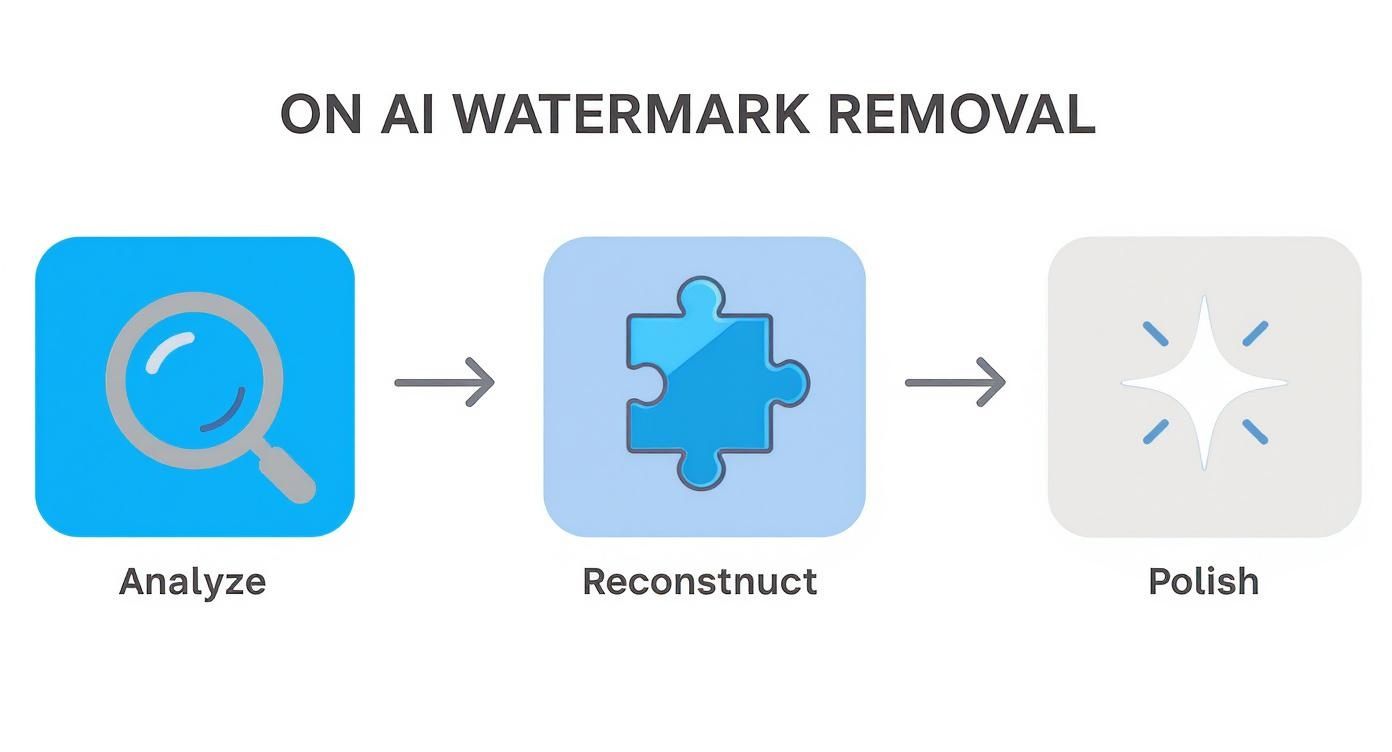
This simple model—Analyse, Reconstruct, and Polish—is the secret sauce behind the incredible results modern AI can deliver without leaving those tell-tale smudges.
After you’ve locked in your selection, you just hit the button and let the AI do its thing. You’ll see a progress bar as it works its way through the video, frame by frame. Tools like SoReel are built for speed, so you’re usually looking at a few minutes, not hours.
Key Takeaway: The quality of your input directly affects the quality of the output. A tight, accurate selection box is the single most important thing you can do to ensure the final video looks clean and completely natural.
Once the process wraps up, you get to see the final result.
Finalising and Exporting Your Video
Don't skip the preview! This is your chance to play the video and scrub through the section where the watermark used to be. Keep an eye out for any weird artefacts or inconsistencies. Honestly, with a decent quality source video, the result is flawless in over 99% of cases, especially for static watermarks.
If you’re happy with how it looks, the last step is to export the clean video. Just download it straight to your computer, and it’s ready to be used in your social media posts, marketing campaigns, or any other project. The whole workflow, from start to finish, is designed to be quick and painless.
Advanced Techniques for Flawless Results
Right, so you've got the basics down. But what happens when you're faced with a really tricky watermark? I'm talking about those semi-transparent logos, animated graphics that dance across the screen, or watermarks plastered over a fast-moving, highly detailed background. These are the scenarios that separate the good results from the truly flawless ones, and they require a bit more finesse.

The secret is giving the AI the best possible information to work with. Think about a faint, see-through watermark. The AI isn't just filling a blank space; it has to intelligently interpret the partial image data it can see through the logo to rebuild what's behind it. This is where a super-precise selection box is no longer just a good idea—it's absolutely essential.
Tackling Complex and Animated Watermarks
Animated or moving watermarks used to be a real nightmare. The old way involved manually tracking the object frame by painstaking frame. Thankfully, a modern watermark remover video tool with AI can automate this tracking completely.
Still, you can give the AI a massive head start. Before you even click "process," watch the clip and identify the watermark's entire journey. If a logo drifts from the top-left to the top-right, for example, make sure your initial selection box covers that entire path. This gives the algorithm the full picture of the area it needs to focus on and reconstruct.
The same principle applies to watermarks over busy backgrounds, like leaves blowing in the wind or a crashing wave. The AI has to work overtime to keep the reconstructed texture looking natural and consistent. In these cases, it's all about what you feed it.
Pro Tip: Always, and I mean always, start with the highest resolution source file you can get your hands on. The more pixel data the AI has to analyse, the more accurately it can rebuild complex patterns without introducing that tell-tale blurriness or nasty digital artefacts.
It's a small step that makes a world of difference, especially when you're aiming for a crisp 4K export.
Preserving Video Quality During Export
Removing a watermark always involves re-encoding the video file. This is a critical moment where all your hard work can be undone by sloppy export settings. The aim is for the final video to be indistinguishable from the original, just without the watermark.
To keep your output looking sharp and professional, stick to these best practices:
- Match Original Settings: Take a moment to check the original video's bitrate, frame rate, and resolution. Your export settings should mirror these as closely as possible to avoid nasty compression artefacts.
- Choose the Right Codec: For most stuff you'll put online, H.264 is the gold standard. But if you're a professional working with top-tier footage, consider a less compressed codec like ProRes if your tool supports it.
- Avoid Multiple Re-encodes: Every time you compress a video, you lose a tiny bit of quality. Think of it like making a photocopy of a photocopy. Try to make watermark removal the very last thing you do before you publish.
Following these simple rules ensures the excellent work of the watermark remover video tool isn't sabotaged right at the finish line.
Streamlining Your Workflow with Automation
For marketing agencies, content creators, or anyone handling a high volume of video, processing clips one-by-one is a huge time-sink. This is where automation features like batch processing and API integration become game-changers.
Batch processing is exactly what it sounds like. You can upload a whole folder of videos, apply the same watermark removal settings to all of them, and let the tool get to work in the background. Say you've got a dozen user-generated clips for a social media campaign, all with the same TikTok logo. Instead of a mind-numbing manual task, you set it up once and you're done.
For an even slicker setup, an API (Application Programming Interface) lets you plug the watermark remover directly into your own software or content management system. This is the perfect solution for businesses that need to process hundreds or even thousands of videos automatically as part of their day-to-day operations, creating a truly seamless content pipeline.
Understanding the UK Market for AI Video Tools
The push for AI video tools is really taking off across the United Kingdom, and it's not hard to see why. We're in a fiercely competitive media environment where businesses are churning out content for platforms like TikTok and Instagram at an incredible rate. Video is king, and the old-school, manual editing methods just can't keep up with the sheer volume and speed required.
Companies all over the UK are waking up to this reality. To stay in the game, they need smarter, faster ways of working. AI tools have moved from being a quirky novelty to an absolute necessity for anyone serious about maintaining a competitive edge. They're solving genuine business headaches—think impossible deadlines, stretched budgets, and the constant need to adapt a single video for five different platforms.
A Market Embracing AI at Pace
UK businesses aren't just dipping their toes in the water; they're diving straight in. The integration of AI into daily operations is happening fast, and the numbers show a market that's way ahead of the curve compared to many of its European counterparts.
This isn't just a trend; it's a fundamental shift in how UK marketing and content teams operate. Take a look at this key data.
The growth and adoption of AI-powered video tools have become a defining feature of the UK's digital marketing scene. The following table highlights some of the most compelling statistics that paint a clear picture of this rapid integration.
Key Statistics on UK AI Video Tool Adoption
| Metric | Statistic | Implication for Businesses |
|---|---|---|
| UK Marketer AI Usage | 51% of video marketers in the UK are already using AI in their workflows as of 2025. | This high adoption rate signals a mature market where AI skills are becoming a standard requirement, not a niche specialisation. |
| European Comparison | The European average for generative AI use in video marketing is only 13%. | UK companies have a significant first-mover advantage, setting new benchmarks for efficiency and content output. |
| Projected Market Growth | The UK AI video market is set to grow at a CAGR of 31.9% from 2025. | This sustained growth indicates long-term confidence and investment in AI, making it a stable area for business development. |
| Future Market Value | The market is projected to be worth over USD 2 billion by 2033. | The sheer scale of the market highlights the immense commercial opportunities for both AI developers and the businesses that adopt these tools. |
These figures aren't just abstract numbers; they represent a strategic advantage for British companies that are quick to adapt. You can find more details on the UK's AI video generation trends.
The benefits are real and immediate.
I worked with a marketing agency in Manchester recently that started using an AI watermark remover for a campaign relying on user-generated content. What used to be a painstaking, multi-hour manual edit for each video became a two-minute automated job. Their team was suddenly free to focus on campaign strategy instead of getting bogged down in pixels.
AI as a Core Marketing Asset
In this kind of environment, a tool like a watermark remover video solution is far more than a simple utility. It's a genuine strategic asset that lets a business move faster, maintain brand consistency, and ultimately, improve its bottom line.
Think about what really drives a UK business today:
- Speed to Market: Getting video content edited and live is everything. AI just shreds the time it takes to do this, helping teams hit even the most aggressive publishing deadlines.
- Cost-Effectiveness: You reduce the reliance on specialist editors and hours of manual work. Suddenly, high-quality video production isn't just for the big players with deep pockets.
- Content Repurposing: Every brand needs to make its content work harder. With AI, you can strip out old branding or platform-specific watermarks in seconds, giving a video asset a whole new lease of life.
For a UK-based e-commerce brand, this might mean grabbing a product demo from a supplier, instantly removing their watermark, and getting it onto their own social channels to jump on a trending topic. That kind of agility used to be a pipe dream; now, it’s becoming the standard for smart British marketers.
Navigating Copyright and Ethical Use
Let's be clear: using an AI watermark remover video tool isn't a free-for-all. It's powerful technology, and with that comes a serious responsibility to understand where the legal and ethical lines are drawn. In the UK, this all boils down to copyright law. A watermark isn't just a design choice; it's often a legal declaration of ownership, and removing it can land you in very hot water.
Before you even think about removing a watermark, you have to ask one fundamental question: do I have the legal right to this video? If it’s your own footage, you're almost certainly in the clear. But if that video belongs to another creator, a brand, or a studio, removing their watermark without getting permission first is illegal. It's as simple as that.
When It's Okay and When It's Not
To get a real sense of this, let's move away from the theory and look at some practical situations you might actually find yourself in.
Green Lights (Perfectly Fine to Proceed):
- Tidying Up Your Own Work: You've been using trial software to edit a video you shot, and it's slapped its branding all over your creation. Now that you've paid for the full version, you have every right to remove that trial watermark.
- Refreshing Old Company Assets: Your company is digging up promotional videos from a few years back, but they’re all branded with an old, outdated logo. As the owner of the footage, you're free to update it for a new campaign.
- Using Licensed Stock Footage: You’ve properly licensed a stock video, but the download still has a watermark. This is common; once your payment is fully processed and the licence is active, you’re good to remove it.
Red Flags (Do Not Do This):
- Stealing a Creator’s Content: You see a great video on TikTok or YouTube, download it, strip the watermark, and then re-upload it as if it's yours. This isn't a clever workaround; it's straight-up copyright theft.
- Repurposing Copyrighted Media: Ripping a clip from a new blockbuster film or a live football match, removing the studio or channel logo, and using it in your own project is a massive infringement.
Crucial Takeaway: The technology itself isn't the problem—it's how you use it. Think of a watermark remover as a tool. Using it on someone else's intellectual property isn't a "loophole." It's an infringement, plain and simple.
The Bigger Picture: Ethics and Trust
Beyond the black-and-white of the law, there's a wider ethical conversation here about the authenticity of digital content. This is a particularly sensitive topic in the UK, where we're seeing a sharp rise in video fraud. With deepfake videos projected to hit 8 million globally by 2025 and research showing 60% of UK consumers have already encountered them, maintaining any kind of trust online is a huge challenge. You can read more about the rise of deepfake videos in this fascinating report.
New legal frameworks like the Online Safety Act are already placing more responsibility on platforms to tackle this.
Ultimately, using a watermark remover video tool responsibly is about respecting the hard work of creators and upholding the integrity of the media we all consume. It's about having the power to reclaim your own content, not misappropriate someone else's.
Your Top Questions About Video Watermark Removal Answered
Even when you've got a great tool at your fingertips, a few questions are bound to pop up. It's only natural, especially when you're concerned about video quality and staying on the right side of the law. Let's tackle some of the most common queries I hear.
This should clear up any lingering doubts and help you move forward with your projects confidently.
Can AI Really Get Rid of a Watermark Flawlessly?
The short answer is, it depends. While today's AI is seriously impressive, a "perfect" removal often comes down to the watermark itself. If you’ve got a solid, static logo sitting over a simple background—like a clear blue sky—the AI can usually erase it without leaving a single trace. It has an easy job of analysing and rebuilding those uniform pixels.
Things get trickier with semi-transparent or moving watermarks, especially when they're over a busy, fast-paced scene. In those tougher cases, you might spot a tiny, almost invisible artefact if you're really looking for it. The best tools get around this by pulling data from the frames before and after, making the reconstructed area look as natural as possible. For most real-world scenarios, the result is practically perfect.
Key Insight: Think of it as a team effort. You provide a high-resolution video and select the watermark carefully, and the AI has a much better chance of delivering a clean, flawless result.
Is it Legal to Remove Watermarks in the UK?
This is a big one, and the answer is refreshingly simple: it all hinges on ownership and permission. It is perfectly legal to remove a watermark from any video that you own the rights to.
Here are a few common, completely legitimate situations:
- You created a video using a trial version of some software and now want to remove its watermark after buying the full licence.
- You’re refreshing old company marketing videos and need to get rid of an old logo you no longer use.
- You've legally licensed some stock footage and the agreement allows you to clean it up for your project.
Where you run into trouble is using a tool to strip a watermark from content you don't own or have a licence for. That's a clear violation of the Copyright, Designs and Patents Act 1988 and constitutes copyright infringement. If you're wrestling with a specific legal question, we've put together a more detailed list of answers over on our comprehensive FAQ page.
Will Removing the Watermark Lower My Video's Quality?
Not if you use a quality tool. The best AI-powered removers are designed specifically to protect your video's visual integrity. Unlike clumsy old methods that just slapped a blur over the logo or cropped the frame, modern AI intelligently rebuilds the pixels that were hidden underneath.
The process does involve re-encoding the video, which is where quality can sometimes take a hit. To avoid this, always work with the highest-resolution source file you have. Then, just make sure your export settings—particularly the bitrate and resolution—match the original video's. Do that, and your final file will look just as crisp and professional as the one you started with.
Ready to see how clean your video can look? SoReel uses advanced AI to remove watermarks flawlessly, clean up audio, and even upscale your video quality in just a few minutes.
Try SoReel for free and make your content truly yours.