Remove Watermarks from Video with AI Tools

Discover how to effectively remove watermarks from video using AI. This guide covers the best tools and legal considerations for clean, professional footage.
A stray watermark can make even the best video feel cheap, instantly undermining your brand's credibility. The fix isn't to crop or blur it out; it's to use AI-powered tools that cleanly remove watermarks, keeping your message front and centre. This is how you preserve video quality and project a polished, trustworthy image.
Why Clean Video Matters for Your Brand
In a sea of online content, first impressions are everything. When someone watches your video, a rogue logo from another platform is an immediate distraction. It breaks their focus and subconsciously screams, "this isn't original," or "this was made on a shoestring budget." It's a tiny detail that can seriously dilute your brand's authority.
Keeping a polished aesthetic isn't just nice to have anymore—it's essential. Put yourself in your audience's shoes. They're scrolling endlessly, and a clean, high-quality video is a signal to stop and pay attention. A random watermark, however, just adds to the digital noise and can cheapen the perceived value of what you're offering.

The True Cost of a Watermark
The damage from a watermark goes beyond just looks. It can hit your key metrics and change how people see your content. A video with a foreign logo might feel less trustworthy, which can tank engagement and kill your conversion rates.
Think about these real-world scenarios:
- Diluted Brand Identity: That TikTok or CapCut logo on a video you've posted to your company's LinkedIn page creates a massive disconnect. It hijacks the focus and essentially gives free advertising to another platform.
- Reduced Viewer Trust: Watermarks can make your content seem recycled or unoriginal, chipping away at the trust you've worked so hard to build.
- Algorithmic Penalties: Many social media platforms are known to subtly downrank content that carries a watermark from a competitor. This can throttle your organic reach before you even get started.
Modern Solutions for a Professional Look
Thankfully, the days of clumsily cropping or blurring out watermarks are over. Cropping lops off important parts of your video, and blurring just replaces the logo with an ugly, distracting smudge. Let's be honest, these old-school fixes often look worse than the original watermark.
The modern approach is to use AI. Advanced algorithms don't just paste a blurry box over the logo; they intelligently analyse the pixels around it and rebuild the area underneath. The result is seamless and natural. This is the secret to a truly professional finish.
The demand for these tools is exploding. In the United Kingdom, for instance, the AI video market is projected to grow at a compound annual growth rate of 31.9% from 2025, topping a value of US$2 billion by 2033. This trend underscores just how vital clean, high-quality video has become. You can read more about the UK AI video market to see how this tech is shaping business.
By taking the time to properly remove watermarks, you're not just tidying up a clip; you're making a direct investment in your brand’s reputation and its future success.
How AI Actually Removes a Video Watermark
Ever wondered what’s happening under the bonnet when you ask an AI tool to remove a watermark? It’s not just a fancy cover-up job. Old-school methods like blurring or cropping are clumsy and obvious, but modern AI approaches the problem with a totally different mindset—it sees the watermark as a puzzle to solve, not just something to hide.
Instead of slapping a blur filter over the logo, an AI system dives deep into the video itself. It doesn't just look at a single frame; it analyses the frames that come before and after, a process known as temporal analysis.
Think of it like a professional art restorer fixing a tear in a classic painting. They don't just paint over the damage. They study the artist's original brushstrokes, the exact shades of colour in the surrounding area, and the texture of the canvas to make the repair completely invisible. AI does the same thing, but for pixels, and it does it thousands of times a second. It learns the patterns, movements, and textures of the background, then accurately predicts what the scene should look like without the watermark.
The Tech Making It Possible
The real engine behind this is a process called generative infilling. This is where the AI algorithm essentially imagines and then reconstructs the pixels hidden by the logo. It’s a world away from the simple clone stamp you might find in a photo editor.
A clone tool just copies pixels from one spot to another. That falls apart in a video because the background is always in motion—light shifts, shadows move, and objects change position. AI, on the other hand, builds a brand-new piece of the scene from the ground up, making sure it perfectly matches the unique context of every single frame.
Here’s a practical example. Imagine a marketing agency has a fantastic piece of user-generated content (UGC) for a new campaign. The clip is perfect, but it’s got a big, distracting TikTok logo on it. An AI tool like SoReel would:
- Analyse the motion: It tracks how the background moves behind the static logo.
- Predict the texture: It figures out the texture of the brick wall or the pattern of the shirt behind the watermark.
- Reconstruct the pixels: It generates entirely new pixels that blend seamlessly into the scene, making the logo vanish without a trace.
This is the kind of power that lets you remove watermarks from a video with a quality that, just a few years ago, would have required a team of expensive VFX artists.
Why This Is a Game-Changer
The difference in the final result is night and day. A blurred-out logo is still a distraction—it screams "something has been covered up here." An AI-restored video, however, is practically undetectable. This keeps your content looking polished and professional, which is absolutely vital for brand credibility.
Let’s say you're a content creator who used a trial version of an editing program, only to find it slapped its own watermark on your final export. Trying to edit that out manually would be a soul-crushing, frame-by-frame ordeal. With an AI solution, the whole thing is automated, saving you hours of tedious work and delivering a far better result.
The numbers don't lie. AI-powered watermark removers are making a real impact, with creators reporting a 35 percent boost in perceived video quality and engagement rates that can sometimes double. These systems deliver fully automated removal up to five times faster than manual editing, with accuracy rates hitting 98.7 percent on common formats like MP4 and MOV. You can read more about these impressive AI video technologies and their growing influence.
AI doesn't just cover up a watermark; it restores the visual integrity of your video. It ensures your story and your message are the only things your audience focuses on. For more tips on building effective content strategies, our team regularly shares insights on the SoReel blog.
AI Watermark Removal vs Traditional Methods
It can be hard to grasp just how different the AI approach is without seeing it side-by-side with older methods. The table below breaks down the key differences between modern AI tools, manual editing techniques, and the basic free tools you often find online.
| Feature | AI Watermark Removal (e.g., SoReel) | Manual Editing (Blur/Crop/Clone) | Free Online Tools (Basic) |
|---|---|---|---|
| Final Quality | Seamless and undetectable. Reconstructs background for a natural finish. | Obvious and distracting. Often leaves a blur or distorted area. | Very low. Usually just a simple blur or a fixed block over the logo. |
| Speed & Efficiency | Extremely fast. Fully automated, processing videos in minutes. | Incredibly slow and labour-intensive. Requires frame-by-frame editing. | Quick for a single video, but lacks advanced features or batch processing. |
| Handling Movement | Excellent. Temporal analysis handles complex moving backgrounds and dynamic watermarks. | Poor. Cloning and blurring fail when the background or camera moves. | Fails completely. Cannot adapt to any movement in the video. |
| Ease of Use | Very simple. Upload or paste a link, and the AI handles the rest. | Difficult. Requires advanced skills in video editing software like After Effects. | Simple, but with extremely limited functionality and poor results. |
| Versatility | Works on static logos, dynamic watermarks, and multiple watermarks at once. | Limited to simple, static logos in non-moving scenes. | Only handles the most basic, static watermarks. |
As you can see, the leap in quality and efficiency is massive. While manual methods have their place for highly specific artistic tasks, for practical watermark removal, AI has become the undisputed champion, leaving basic online tools far behind.
Your Workflow for Flawless Watermark Removal
It’s one thing to talk about how AI works, but the real test is seeing it in action. So, let's get our hands dirty and walk through a proper workflow for stripping watermarks from a video. I’ll use SoReel as our go-to example because it handles both local files and web links really well.
The magic here is in its simplicity. You’re not spending hours masking frames or cloning pixels like in the old days. You just point the AI at the watermark, and it does all the heavy lifting. What used to be a tedious editing chore now takes just a few minutes.
Starting With a Video File on Your Computer
This is the most common scenario. You’ve got a video file saved on your hard drive – maybe it’s a clip you exported from a trial version of some editing software, or perhaps it's a piece of user-generated content (UGC) someone sent you. Getting it clean is surprisingly straightforward.
Most tools like SoReel have a simple drag-and-drop interface. Just pull your file into the window, and it’ll pop up in a preview screen, ready for you to work your magic.
Now for the only manual bit: you draw a box around the watermark. Don’t stress about getting it pixel-perfect; the AI is clever enough to figure out the boundaries. If you've got multiple watermarks, like a logo in the corner and a scrolling username, you can select them both.
From there, the AI takes over.
- Confirmation: You lock in your selection.
- Processing: The system crunches the data, analysing the video frame by frame.
- Reconstruction: It intelligently rebuilds the pixels that were hidden behind the logo or text.
- Preview: You get a sneak peek of the finished product before you even hit download.
Working directly from a source file usually gives you the best quality, as you’re not dealing with any extra compression from a web platform.
Working Directly From a URL
But what if the video isn't on your computer? This happens all the time, especially if you're pulling content from TikTok, Instagram, or even AI generators like Sora. This workflow is actually even quicker.
Instead of uploading anything, you just paste the video’s URL into a field. The tool fetches the video for you. After that, it's the exact same process: draw a box around the watermark in the preview and let the AI do its thing.
This is a massive time-saver. Think about it. If you need to prep a dozen social media clips for a new campaign, you can skip the whole download-then-upload routine for every single one. You work straight from the links, which lets you get back to the creative side of things much faster.
From my experience, the URL method is a game-changer for anyone working at scale. I've seen social media managers cut their prep time for UGC campaigns by over 50% just by ditching the download-and-upload cycle for 20 or 30 clips.
The AI’s process is a neat three-step dance: it analyses the problem area, reconstructs the background, and seamlessly stitches it all together.
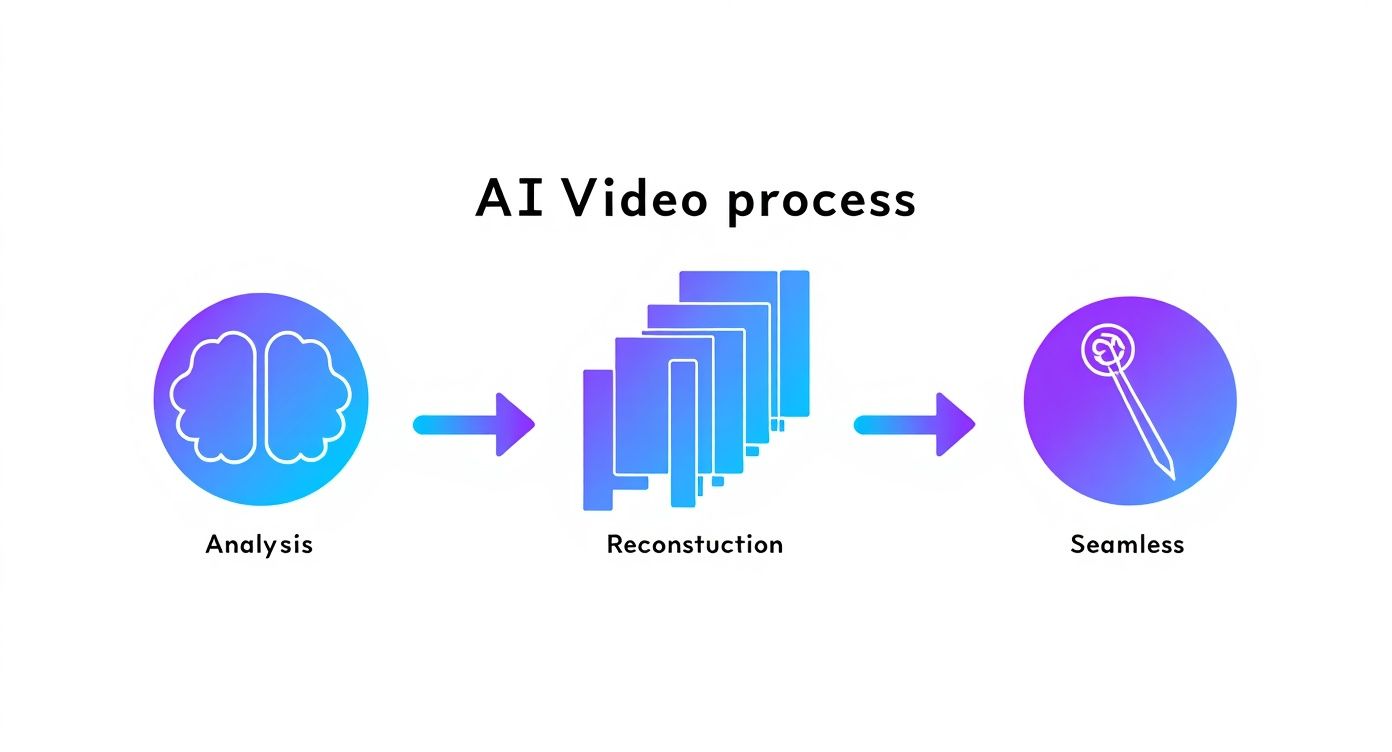
This behind-the-scenes intelligence is what turns a complex editing task into a simple, automated action.
Advanced Workflows for Power Users
The single-video workflow is great for one-off jobs, but what if you're an agency, developer, or a creator churning out content by the bucketload? When you’re dealing with hundreds of videos, you need something that can keep up. That’s where batch processing and API integration come in.
Batch processing lets you upload or link to a whole folder of videos and apply the same watermark removal settings across the board. It's a lifesaver for big projects. Imagine an agency trying to build a sizzle reel from 50 different client testimonials, each with its own social media branding. Instead of a mind-numbing, one-by-one process, they can just queue them all up and hit "go." What could take a full day becomes a single automated task.
API integration is the next level. An API (Application Programming Interface) allows developers to plug watermark removal functionality directly into their own software. A marketing tech platform, for instance, could use SoReel's API to let its users clean up videos without ever leaving that platform. This opens up some powerful automation, like a workflow that automatically de-watermarks any new video dropped into a specific cloud folder.
Key Settings to Keep an Eye On
While the AI handles most of the work, a few small tweaks can make a real difference to your final video.
- Export Quality: Always match your export settings to the source file. If the original is 1080p, export in 1080p. Don't let unnecessary compression ruin your hard work.
- Selection Area: Be thorough. Your selection box needs to cover the entire watermark, especially if it moves around. A little bit of overlap is much better than leaving a ghostly remnant behind.
- Dynamic Watermarks: This is a big one. For watermarks that drift across the screen, you need a tool that can handle motion. Modern platforms like SoReel are built for this – they track the object from frame to frame, ensuring the removal is clean and consistent from start to finish.
Once you get the hang of these workflows, you’ll be able to turn almost any watermarked video into a polished, professional asset that’s ready for any platform.
Protecting and Polishing Your Final Video
Getting that watermark off is a great feeling, but your job isn't quite done. Think of it as the first major hurdle cleared. Now, it's all about making sure the final video is not just visually clean but also technically perfect and ready to perform wherever you post it.
This is about more than just hitting the export button. You need to think about how you’re going to preserve the original quality, get rid of any hidden digital baggage, and make sure social media algorithms are going to love your content.
Preserving Quality During Export
Once the AI has done its job, your export settings are the final checkpoint for quality. A sloppy export can introduce compression artefacts or pixelation, basically undoing all the hard work you just put in.
The golden rule here is simple: match your export settings to your source file's quality. If you started with a beautiful 1080p video, don't suddenly downgrade it to 720p. A proper tool like SoReel gives you control over these crucial settings, letting you render a video that looks just as good as the original—only without the watermark.
Erasing Hidden Metadata and Digital Fingerprints
This is a step so many people miss. The watermark you see is only one part of a video's identity. Hidden inside the file is a trail of metadata—invisible data tags that can include everything from when the video was created to the software used.
So why should you care? Because platforms like TikTok and Instagram are smarter than you think. Their algorithms are built to spot and prioritise content that looks and feels native. If you upload a video still carrying metadata from a rival platform, it's a huge red flag.
That digital fingerprint can lead to your content being quietly throttled. The algorithm sees it as repurposed and suppresses its reach. Stripping out all that metadata is essential to make your video appear fresh and original, giving it the best possible shot at going viral.
Optimising for Platform Compliance
A genuinely clean video is more than just visually flawless; it's a file that social platforms are happy to promote. When you remove a watermark and scrub the metadata, you’re basically optimising your content for maximum reach.
A clean, metadata-free video looks like it was made specifically for the platform you're uploading to. It screams originality, and that can have a direct and positive impact on your engagement. It’s a small technical detail that makes a massive strategic difference.
This kind of optimisation has become non-negotiable. With video consumption in the UK expected to jump from 52% in 2020 to 65% in 2025, the pressure is on to deliver perfectly polished content. This trend is also driving the AI watermarking market, valued at USD 613.8 million in 2025, as UK media firms search for better ways to manage their assets. You can read more about the growth of AI watermarking to get a fuller picture of the market.
Adding Your Own Professional Watermark
Now that the video is truly yours, it's time to protect it. The final touch is adding your own subtle, professional watermark. This isn't about slapping a massive logo across the screen; it's about smart, strategic branding.
Here are a few best practices I've picked up over the years:
- Subtlety is Key: A small, semi-transparent version of your logo tucked into a corner is all you need. The aim is recognition, not obstruction.
- Think About Placement: The bottom-right corner is a safe bet. It's usually out of the way of the main action and less likely to be covered by platform interface elements.
- Stay Consistent: Use the same watermark design and position across all your videos. This consistency is what builds a strong, recognisable brand identity.
This last step brings everything full circle. You've taken off someone else's brand to reclaim your work, and now you're adding your own to protect it and build your own equity. Your content is officially polished, protected, and primed for success.
Staying on the Right Side of Copyright Law
Let's talk about the elephant in the room. Being able to strip a watermark from a video with a single click feels like a superpower, but with that power comes a huge responsibility. For any serious creator, brand, or marketer, the ethics and legality of this aren't just an afterthought—they're central to doing business correctly.
Getting this right protects you from legal headaches, keeps your accounts in good standing on social media, and ultimately helps you build a trustworthy brand.
The guiding principle is incredibly simple: you must have the legal right to alter the video. Just because the technology exists doesn't mean you have a green light to use it on any video you find. The tool itself is neutral; it's your intent and your rights to the content that matter. Getting this wrong can lead to copyright strikes, platform bans, and a damaged reputation.
Legitimate Reasons to Remove Watermarks
So, when is it actually okay to remove a watermark? There are plenty of perfectly legitimate, everyday situations where you might need to clean up a video you already have the rights to. This isn't about stealing content; it's about reclaiming your own work.
Here are a few common scenarios I see all the time:
- Licensed Stock Footage: You’ve paid for a licence for a great clip from a stock video site. The preview version you worked with had a big watermark plastered across it. Now that you've paid, you have every right to the clean version. If you only have the watermarked file, using a tool to remove it is perfectly fine because you've legally secured the usage rights.
- Software Trial Versions: You’ve been testing out a new video editor and created an amazing video, but the free trial slapped its logo on your final export. Once you buy the full software licence, you own the content you made. Removing that trial watermark is completely legitimate.
- Archiving Your Own Content: Maybe you've got old videos saved from platforms that are now defunct, or you've found a copy of your work that had a channel's bug added to it. As the original creator, you have the right to restore your own content for your current portfolio.
In all these examples, the person removing the watermark has a clear, defensible right to the video. The watermark is just an obstacle on a piece of content they already own or have licensed.
The Red Line You Cannot Cross
The ethical line is crossed the second you remove a watermark from a video you don't own and don't have permission to use. That's copyright infringement. There's no grey area here. It's the digital equivalent of finding a painting, scrubbing off the artist's signature, and claiming you made it.
Using an AI tool to take someone else's content isn't a clever hack; it's a direct violation of their intellectual property. Platforms like YouTube and Instagram are getting better at spotting this, and the penalties can be steep.
A watermark is there for a reason—it’s a form of copyright protection. Intentionally removing it from another creator's work to re-upload it is often seen as wilful infringement, which can carry much more severe legal consequences.
Before you ever hit that "remove" button, you need to be certain you have the right to do so. We take this very seriously, which is why our user responsibilities are clearly defined in the SoReel terms of service.
To make this crystal clear, here’s a simple checklist to run through.
Ethical Use-Case Checklist for Watermark Removal
Use this table to quickly gut-check whether your reason for removing a watermark is on solid ground.
| Scenario | Is It Generally Permissible? | Key Consideration |
|---|---|---|
| You created the original video. | Yes | You own the copyright. |
| You purchased a full usage licence for the video. | Yes | Your licence grants you the right to an un-watermarked version. |
| You are removing your old company logo from your own content. | Yes | You are updating your own intellectual property. |
| You're using content downloaded from social media that isn't yours. | No | This is a clear copyright violation. |
| The video is in the public domain. | Yes | Public domain content is free for all to use and modify. |
| You want to repost a viral clip to your own account for views. | No | You do not own the content, and this infringes on the creator's rights. |
Ultimately, your goal should be to use watermark removal tools as they were intended: to restore and enhance your own creative assets, not to take from others. By respecting copyright, you ensure your workflow is not only effective but also completely ethical.
Got Questions About Removing Video Watermarks? We've Got Answers.
Jumping into AI video editing can feel a bit like magic, and it's natural to have a few questions. When you're looking to clean up a video by removing a watermark, a few common concerns always seem to pop up. Let's tackle them head-on so you can get started with confidence.
Probably the biggest worry I hear is about quality. After all, nobody wants to trade a watermark for a blurry mess.
Will Taking Out a Watermark Ruin My Video Quality?
Not with the right tools. Forget those old-school methods that just slapped a clumsy blur over the logo. Modern AI is far more sophisticated. It uses a technique called content-aware infilling, which sounds complex, but the idea is simple: the AI analyses the pixels around the watermark to intelligently rebuild what’s hidden behind it.
The whole point of this approach is to preserve the video’s original clarity and resolution. To get the best results, always start with the highest-quality file you have and choose a high-quality export option. When done right, the final video should look like the watermark was never there to begin with.
Another classic headache is dealing with logos that just won't sit still.
Can AI Handle Moving Watermarks?
Absolutely. In fact, this is one of the areas where AI really shines. A good AI tool doesn't just look at one frame; it tracks the watermark as it drifts, fades, or changes size throughout the clip. It identifies the watermark as a consistent object and applies the removal logic frame by frame.
This is a lifesaver for dealing with tricky dynamic elements, like:
- The scrolling usernames you see on TikTok videos.
- Animated channel logos that broadcasters stick in the corner.
- Fading "trial version" watermarks from editing software.
The AI automates what would be an incredibly tedious manual job, delivering a clean result that’s almost impossible to achieve by hand.
It’s easy to get caught up in how the technology works, but the real question for any professional is when it's appropriate to use it. Power and responsibility go hand-in-hand.
Is It Actually Legal to Remove a Watermark?
This is a big one: no, it's not always legal. The key is ownership. It's generally fine to remove a watermark from content you own the rights to. For example, if you've created a video with a trial version of some software and want to remove its logo, that's your own work. The same goes for stock footage you've properly licensed.
Where you run into trouble is removing a watermark from copyrighted material you don't own. That’s copyright infringement, plain and simple. Always make sure you have the legal right to alter the video. If you want to dig deeper into the specifics, we cover this and more in our frequently asked questions about watermark removal.
Finally, many people don't realise that the visible logo is only part of the puzzle.
What’s the Difference Between a Watermark and Metadata?
Think of it like this: a watermark is the visible logo or text you see overlaid on the video. Getting rid of it is a visual edit—you're changing the pixels in each frame to restore the image.
Metadata, however, is the invisible information tucked away inside the video file itself. This can include anything from the creator’s details to the software used, and even a unique digital fingerprint. A truly clean video needs both addressed. Removing the watermark makes it look good for your audience, but stripping the metadata erases hidden identifiers that could cause issues with platform algorithms or copyright claims down the line.
Ready to create pristine, professional videos? With SoReel, you can remove any watermark and reclaim your content in minutes. Start cleaning your videos today.