How to Remove TikTok Watermarks A Complete Guide for Creators

Learn how to remove TikTok watermarks from your videos with this complete guide. We cover AI tools, manual editing, and ethical best practices for UK creators.
So, you need to get rid of a TikTok watermark. You've got two main routes you can go down. The quick-and-dirty method is to manually crop the video, literally chopping off the bits with the watermark. It’s fast, but you'll lose part of your original frame. The other, more polished approach is to use a third-party AI tool that intelligently erases the watermark without touching the video's dimensions.
The best choice really boils down to what you value more: speed or a clean, professional finish that keeps your original video intact.
Why and When Should You Remove a TikTok Watermark?
Before we jump into the "how," let's take a moment to consider the "why." This isn't just about making a video look tidier; it's a strategic move for any creator or marketer wanting their content to perform well across the board. The digital world is all connected, and a great video shouldn't be confined to just one platform.
The number one reason is content repurposing. You’ve put time and effort into creating a fantastic video, and naturally, you want to share it on Instagram Reels, YouTube Shorts, or maybe even LinkedIn. The problem is, rival platforms aren't big fans of seeing each other's logos. Uploading a video with a blatant TikTok watermark can get your content deprioritised by their algorithms, throttling its reach before it even has a chance.
Creating a Cohesive Brand Image
Another huge factor is brand consistency. If you're running a business, building a personal brand, or working as an influencer, a uniform look across your channels is non-negotiable. A stray TikTok watermark can instantly disrupt the clean, professional aesthetic you've worked so hard to build.
Think about your content as a collection of digital assets. When you’re putting together a showreel for a new client or embedding videos on your website, that watermark looks unprofessional. It's effectively free advertising for another platform right in the middle of your own branded space.
Real-World Scenarios for Watermark Removal
Let's look at a few common situations where this becomes a no-brainer:
- Multi-Platform Strategy: Imagine you're a small UK business that’s just made a brilliant product demo on TikTok. To hit a different demographic on Instagram, you need to post it there, too—but without the watermark that practically screams "this is a repost."
- Professional Portfolios: As a freelance videographer, your website is your shop window. Showcasing clips with watermarks instantly makes the work feel less professional and can even create confusion over who owns the content.
- Internal Communications: Your company used TikTok's fantastic editor to create an engaging training video. When it's time to share it on the corporate intranet, the watermark is just a needless distraction.
Removing a watermark from your own content is about taking back control. It allows you to present your work cleanly and strategically, ensuring it performs optimally wherever you choose to share it.
The scale of TikTok makes this a very real issue for creators. By 2024, the platform had an estimated 8 million users in the UK alone, and with around 40% of Gen Z using it as a search engine, its influence is massive. This widespread adoption means countless creators are looking for ways to extend their content's life beyond a single app. Learning more about UK TikTok usage statistics can really highlight the importance of a solid cross-platform strategy. Ultimately, this is about empowering you to have full control over your creative work.
Picking the Right Watermark Removal Method
Figuring out the best way to remove a TikTok watermark really isn't a one-size-fits-all deal. The right approach for you will depend on a few key things: how much time you have, how important the final video quality is, and what your budget looks like. It’s like picking the right tool for a job – you wouldn't use a sledgehammer to hang a picture.
You've basically got three main paths you can go down. Each one has its own set of pros and cons, which makes them a better fit for different people and projects. Let's dig into these options so you can find the one that makes the most sense for you.
Manual Cropping: The Quick and Dirty Fix
The most straightforward method is to just crop the video. You can do this with just about any basic video editor on your phone or computer. All you have to do is adjust the video's frame to physically chop off the parts where the watermark bounces around.
This technique is super fast and doesn't require any special software or skills. The big downside, though, is that you're literally cutting away parts of your video. This messes with the original composition, and you could end up losing important visual details, which completely changes the vibe of your content.
In-App Tricks and Sneaky Workarounds
Some savvy creators have found clever workarounds right within other apps. A popular one involves using an app like CapCut (which, funnily enough, is owned by TikTok's parent company, ByteDance). The trick usually involves a specific export process that saves a clean version to your camera roll without actually posting it to TikTok.
While this can work and it's free, it’s often a bit clunky and not something you can count on. These kinds of loopholes can get patched up with any app update, making it a pretty shaky foundation for any serious content workflow.
This approach always felt more like a temporary hack than a reliable solution to me. It might work today, but it's not ideal if you need a dependable way to get rid of watermarks as a regular part of your content creation.
AI-Powered Removal Tools: The Professional's Choice
For anyone who really cares about quality and maintaining a professional look, dedicated AI-powered tools are, without a doubt, the way to go. Platforms like SoReel are built from the ground up to remove TikTok watermarks without ruining the original video.
Instead of just crudely cropping or slapping a sticker over the watermark, these systems use sophisticated AI to analyse the pixels behind the logo and intelligently rebuild that part of the frame. The result is a perfectly clean video that looks like the watermark was never there. This means your original aspect ratio is preserved, and you don't lose a single pixel of your hard work.
This screenshot from SoReel's homepage gives you a good idea of how clean and simple these tools are designed to be.
The whole process is focused on simplicity. You just upload your video and let the AI do the heavy lifting of pixel reconstruction.
Many of these services are subscription-based, but that investment often pays for itself pretty quickly in time saved and the sheer quality of the final video. If you're a business, an agency, or just a creator who takes their work seriously, this is easily the most reliable and effective method. You can check out the SoReel pricing plans to get an idea of how this could slot into your workflow.
Comparison of TikTok Watermark Removal Methods
To help you decide at a glance, here’s a quick breakdown of how the different techniques stack up against each other.
| Method | Pros | Cons | Best For |
|---|---|---|---|
| Manual Cropping | Extremely fast and free; no special software needed. | Destroys the original aspect ratio and cuts out visual content. | Quick, one-off fixes where perfect framing isn't critical. |
| In-App Tricks | Free and can produce a high-quality result. | Unreliable, clunky, and can stop working after any app update. | Casual users who don't need a consistent, long-term solution. |
| AI Removal Tools | Highest quality; preserves the original video frame perfectly. | Typically requires a paid subscription. | Professionals, agencies, and businesses who need consistent, high-quality results. |
Ultimately, choosing your method comes down to what you value most. For a quick, casual removal, cropping might be good enough. But for anyone serious about their content's quality and brand image, an AI tool provides a flawless finish that manual methods simply can't compete with.
Using AI Tools for a Flawless Finish
Sometimes, a quick crop or an in-app trick just doesn't cut it. When you need your video to look completely clean and professional, without any compromises, that's where AI-powered tools come into their own.
Instead of crudely chopping off the edges of your video or leaving a blurry smudge where the watermark used to be, AI takes a much smarter approach. Think of it as the difference between using masking tape to patch a hole in the wall and having a professional plasterer make it look like the damage never even happened.
These tools don't just cover up the watermark; they intelligently reconstruct the pixels hidden beneath it. The AI looks at the frames just before and after the logo appears, using that visual data to seamlessly rebuild the obscured area. This means your video's original aspect ratio stays perfectly intact, preserving every bit of your hard work.
Why AI is the Superior Choice
The real magic of using an AI tool to remove TikTok watermark is the precision. You lose zero video content and are left with no distracting blurs. The final result is a crisp, high-quality video that looks like it was created without a watermark from the start, making it perfect for repurposing on platforms like Instagram Reels or YouTube Shorts.
For creators and brands who care about a polished image, this is a game-changer. It helps maintain brand consistency and ensures your content always looks top-notch, no matter which platform you share it on.
This diagram shows the typical thought process when deciding on a method, and you can see exactly where AI fits into a professional workflow.
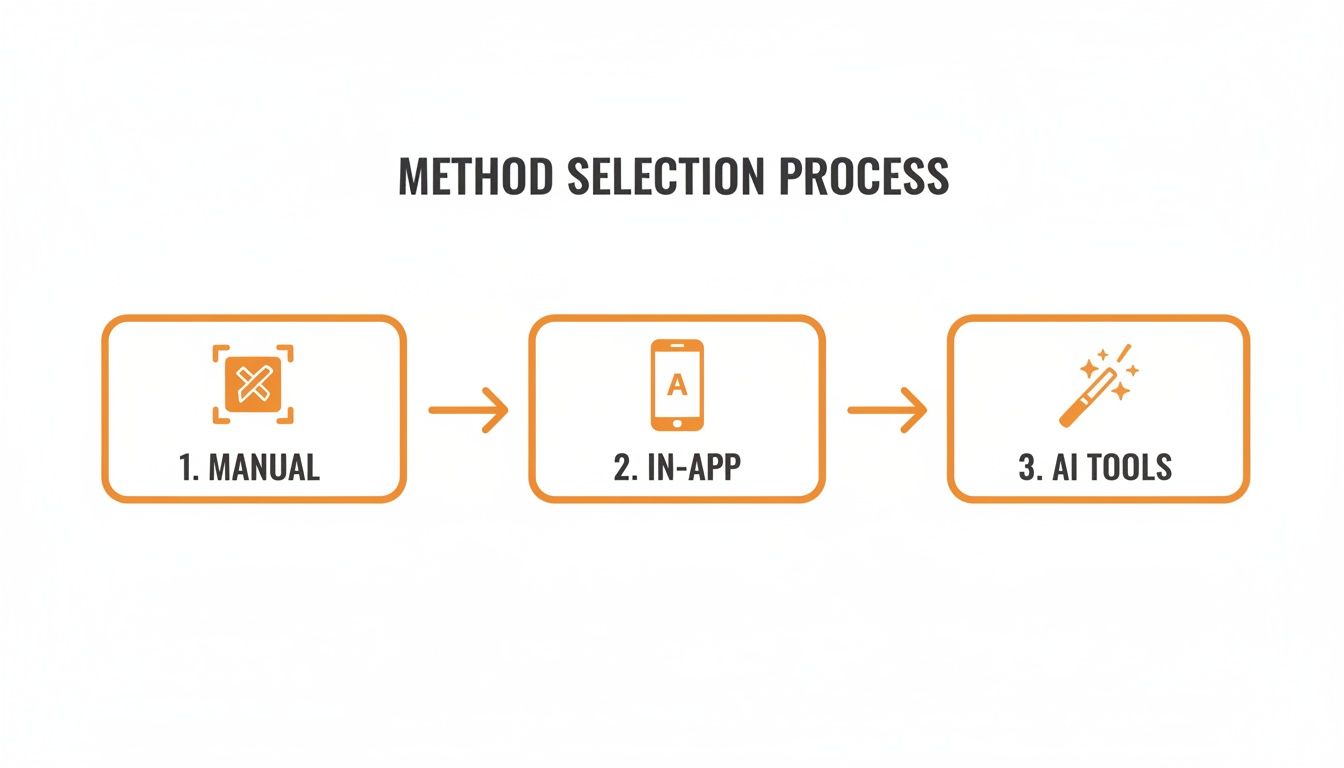
As you can see, when quality is the top priority and a perfect finish is non-negotiable, AI tools are the final, most effective step. This is especially true for professionals who simply can't afford to compromise on their content's visual integrity.
The Typical AI Removal Workflow
While every tool has its own interface, the core process for using an AI watermark remover is surprisingly consistent and straightforward. They're designed to be easy to use, even if you have zero technical skills.
Getting from a watermarked video to a clean final version usually just takes a few simple steps:
- Grab Your Video Link: First up, find the TikTok video you need. Tap the "Share" button and then "Copy Link" to get the URL.
- Paste it into the AI Tool: Head over to your chosen tool, like SoReel. You'll almost always see a clear input box where you can paste the link you just copied.
- Start the Process: With the link in place, you just have to click a button—usually something obvious like "Remove Watermark" or "Go"—to let the AI do its thing.
- Download Your Clean Video: The tool will work its magic, which can take anywhere from a few seconds to a minute, depending on the video's length. Once it's done, you'll get a download link for your clean, watermark-free file.
This simple workflow turns what sounds like a complex technical problem into a quick, painless task. For more in-depth tips on content creation, you can find a bunch of useful guides over on the SoReel blog.
The real power of AI isn't just in removing what you don't want, but in perfectly preserving what you do. It respects your original creative vision by keeping the frame and quality intact—something manual methods simply cannot do.
Scaling Up with Batch Processing and APIs
Doing videos one by one is fine for a one-off, but for social media managers, agencies, or brands dealing with a ton of content, it's a massive bottleneck. This is where professional-grade AI tools really show their value with features like batch processing and API access.
Batch processing lets you upload or paste links for multiple videos at once, letting the AI churn through the whole list automatically. Instead of sitting there waiting for each one to finish, you can set up a batch job, go do something else, and come back later to download all your clean files. It's a huge time-saver for anyone looking to repurpose a whole library of content.
For the ultimate hands-off workflow, an Application Programming Interface (API) is the answer. An API lets developers plug the watermark removal tech directly into their own software or content management systems.
Imagine an agency setting up a system where clients upload their TikToks to a folder. The API could automatically detect them, remove the watermarks, and drop the clean versions into an "Approved for Instagram" folder. This completely eliminates the manual work, making it possible to repurpose content at a huge scale without anyone having to lift a finger for the removal process itself. That's how a simple tool becomes a core part of a professional marketing machine.
Manual Tricks for a Quick Fix
Sometimes you just need to get a watermark off a video now, without the hassle of downloading a new app or signing up for a service. In those moments, manual methods are your best friend. These techniques use the basic video editing tools you likely already have on your phone or computer, making them incredibly quick and accessible.
Think of these as the scrappy, in-a-pinch solutions. They might not give you the flawless finish of an AI tool, but they're surprisingly effective for a quick share with friends or an informal post. The two main ways to go about it are either cropping the video to slice the watermark out completely or using an effect to cover it up. Each has its own pros and cons.
The Crop Method: Quick and Dirty
Cropping is the most straightforward approach. You're literally just resizing the video frame to cut out the top and bottom edges where the TikTok logo appears. Since the watermark helpfully jumps from one corner to the other, you have to trim enough to remove it from both positions throughout the clip.
This is fast. Seriously fast. You can do it in seconds on your phone’s default editor, whether that's Photos on an iPhone or Google Photos on Android. Just open the video, hit the crop tool, and drag the corners in. The big downside, of course, is that you’re losing a chunk of your video. This can mess up your original composition and potentially remove important visual details, which is a real problem for tightly framed shots.
To make the best of a bad situation, here are a few tips I've picked up:
- Film with cropping in mind. If you anticipate needing to crop later, deliberately shoot with extra empty space around your main subject. This gives you a "safe zone" to work with, so you don't end up cutting off someone's head.
- Keep the 9:16 aspect ratio. When you're repurposing for Instagram Reels or YouTube Shorts, the video needs to stay in that vertical 9:16 format. Pay close attention as you crop to make sure the final dimensions will fit the new platform without weird black bars.
- Protect your focal point. Figure out what the most important part of the frame is and keep it centred. As you adjust the crop, make sure the audience's eyes are still drawn to where you want them to be.
Cropping is always a trade-off. You get speed and convenience, but you sacrifice your original framing and some visual information. It’s the perfect choice for when "done" is better than "perfect."
Hiding the Mark: Using Blurs and Overlays
If you can't afford to lose any part of the frame, your next best manual option is to obscure the watermark. This just means covering it with something else, like a subtle blur, a small sticker, an emoji, or even a solid block of colour. If you’re using more advanced desktop software, you might have a "clone stamp" tool that lets you paint over the watermark using pixels from a nearby part of the video.
A blur effect can be less jarring than a hard crop because it keeps your video's dimensions intact. The trick is to make the blur as discreet as possible. A huge, obvious blurry box just screams, "I'm hiding a watermark here!"
For a cleaner look, try to match the size and shape of your blur or overlay to the watermark itself. Some apps even let you "feather" the edges, which softens the transition and helps it blend into the background. While this method preserves your original framing, it does leave a permanent blemish on the video. It clearly shows something has been covered up, which might not be the professional vibe you’re going for.
Understanding the Legal and Ethical Rules
Before you even think about removing a watermark, let's get something straight. This isn't just a technical exercise; there are some pretty clear ethical and legal lines you absolutely shouldn't cross. The methods we discuss are powerful, but with that power comes a responsibility to respect other creators and the platforms we all use.
It all boils down to one simple, golden rule: only ever remove the watermark from content you created and own. That little TikTok logo does an important job—it’s digital attribution, giving credit where it's due and pointing viewers back to the original creator. When you strip that from someone else's video, you're not just making a quick edit; you're actively erasing their credit.
What TikTok's Terms of Service Actually Say
When you created your TikTok account, you agreed to their Terms of Service. Buried in that long document is a key detail: while you own your content, you give TikTok a licence to use it, which includes adding their watermark to downloads.
Their policies are there for a reason—to protect intellectual property. Taking someone else’s video, removing their logo, and reposting it without their permission is a clear violation. And trust me, TikTok’s algorithm and moderation teams are always scanning for this kind of thing.
The penalties for breaking these rules can stack up fast:
- Content Takedown: The first thing that will likely happen is your video gets removed.
- Account Strikes: You could get a "strike" against your account, which might mean you can't post or go live for a while.
- Shadowbanning: This is a sneaky one. The algorithm might quietly throttle your reach, making it almost impossible for new people to find your content.
- Permanent Suspension: Keep breaking the rules, and you risk getting your account banned for good. All that work, gone.
Copyright Infringement Is No Joke
On top of TikTok's own rules, you’ve got actual copyright law to think about. A creator’s video is their intellectual property, just like a song or a photograph. Using it without permission is, legally speaking, infringement.
Imagine you spent hours coming up with an idea, filming it, and editing it perfectly, only to see someone else repost it and get all the credit. It’s more than just unfair; it's a legal issue. While you're more likely to face an account ban than a lawsuit, the risk is real.
Think of the ability to remove a TikTok watermark as a tool for managing your own content, not for stealing someone else's. It’s for repurposing your creative work to build a consistent brand across different platforms.
The moderation landscape here in the UK is especially tight. Around 19.65% of all TikTok videos that are flagged or taken down globally come from the UK, putting us in the top ten countries for removals. This highlights just how seriously TikTok takes its own guidelines, including those around content ownership. You can read more about UK TikTok content moderation on The John Fleming's blog. With that level of scrutiny, your chances of getting caught for misusing content are much higher.
So, the ethics are simple. If you made it, you can present it however you want. If you didn't, leave the watermark alone and let the original creator get the recognition they deserve. It keeps you safe, shows respect for fellow creators, and helps keep the whole digital space a bit fairer for everyone.
Troubleshooting Common Removal Issues
Even when you think you’ve nailed the perfect way to remove a TikTok watermark, things can still go sideways. You might export a video only to find the quality has tanked, or worse, the audio is completely out of sync. These little headaches can easily throw a spanner in the works, but thankfully, most of them have pretty simple fixes.
Don’t panic if your first go isn't perfect. A big drop in video quality is probably the most common complaint I hear. This almost always happens when the removal tool re-compresses your file using a much lower bitrate than the original. The trick is to get into the export settings before you commit. Look for options to set a higher resolution – always aim for 1080p if you can – and choose a variable bitrate to keep as much detail as possible.
Fixing Sync Errors and Export Failures
Another classic problem is the audio and video drifting apart. A sync error makes a video totally unwatchable, and it often crops up because the software struggles with the variable frame rates common in smartphone footage. If you find your go-to tool is repeatedly causing this issue, the easiest solution is often just to try another one. Some apps are simply built better to handle different video codecs.
Then there are the dreaded export failures, where the video gets stuck processing or just won’t save. Before you throw your computer out the window, run through these quick checks:
- Sufficient Storage: Do you have enough free space? High-resolution videos can be surprisingly massive files.
- Stable Connection: If you’re using an online tool, a dodgy internet connection can easily interrupt the process and cause it to fail.
- File Permissions: Is the app actually allowed to save files where you want it to? A quick check of your settings can solve this.
The whole point is to make watermark removal a seamless part of your content workflow, not a technical nightmare. Figuring out the root cause—whether it’s a simple settings mismatch or a limitation of the tool you’re using—is the key to getting a clean, high-quality result every time.
These technical hitches are more important than you might think, especially with platforms cracking down on repurposed content. In the last quarter of 2024 alone, TikTok removed nearly 153 million videos globally for policy violations. For creators in the UK, a watermarked video reposted elsewhere is like a digital signature, making it easy for algorithms to spot and potentially take down your content. That’s why getting a flawless, high-quality removal is so crucial.
If you’re interested in the numbers, you can explore detailed statistics on TikTok's video removals by country for a closer look.
Frequently Asked Questions
When you start removing watermarks, a few questions always pop up. Getting the right answers is crucial for working smartly and staying on the right side of platform rules.
One of the biggest worries I hear is about video quality. Will taking the watermark off wreck my video? With old-school methods like cropping, absolutely. You end up chopping off part of your frame. But modern AI tools are built for this exact problem; they cleverly rebuild the pixels that were hidden under the logo, keeping your video's quality and original size intact.
Is It Legal to Remove a TikTok Watermark?
This is the big one, and it's super important to get right.
It’s completely fine to remove a TikTok watermark from a video that you personally created. This is all about you controlling your own creative work and how it appears on different platforms.
Where you run into trouble is taking someone else's video, stripping the watermark, and passing it off as your own. That’s a major no-go. It’s against TikTok’s terms and can even be a copyright infringement. The rule of thumb is simple: if you didn't make it, don't touch it.
Think of it this way: watermark removal is for creators who want brand consistency. It lets you optimise your own videos for places like Instagram Reels or YouTube Shorts, not take credit for someone else's hard work.
People also ask if platforms like Instagram can tell a watermark has been removed. A high-quality AI removal is visually seamless, making it pretty much impossible for anyone—or any algorithm—to spot. This helps you avoid the risk of your content being pushed down, which can happen when one platform spots a rival’s logo.
For a deeper dive into other common questions, we've put together more detailed answers on our comprehensive FAQ page. At the end of the day, using these tools responsibly on your own content is what makes for a winning multi-platform strategy.
Ready to create clean, professional-looking videos without those distracting watermarks? Give SoReel a go and see how our AI can clean up your content in minutes. Get started for free at SoReel.app.